
A Way to Boost Webinar Engagement: Comment Banners
Questions are one of the most powerful elements of any webinar. They reveal what people are thinking, highlight what matters most, and turn a presentation into a shared learning experience. When you bring those questions directly onto the screen using comment banners, you not only answer them — you elevate them. You give them the attention they deserve and make them a purposeful part of your content, not just something addressed on the side.
Comment banners.
These small on-screen callouts, usually a horizontal bar that displays an attendee’s question or reaction do far more than decorate the video feed. Used intentionally, they become a dynamic part of your storytelling, pacing, and audience connection.
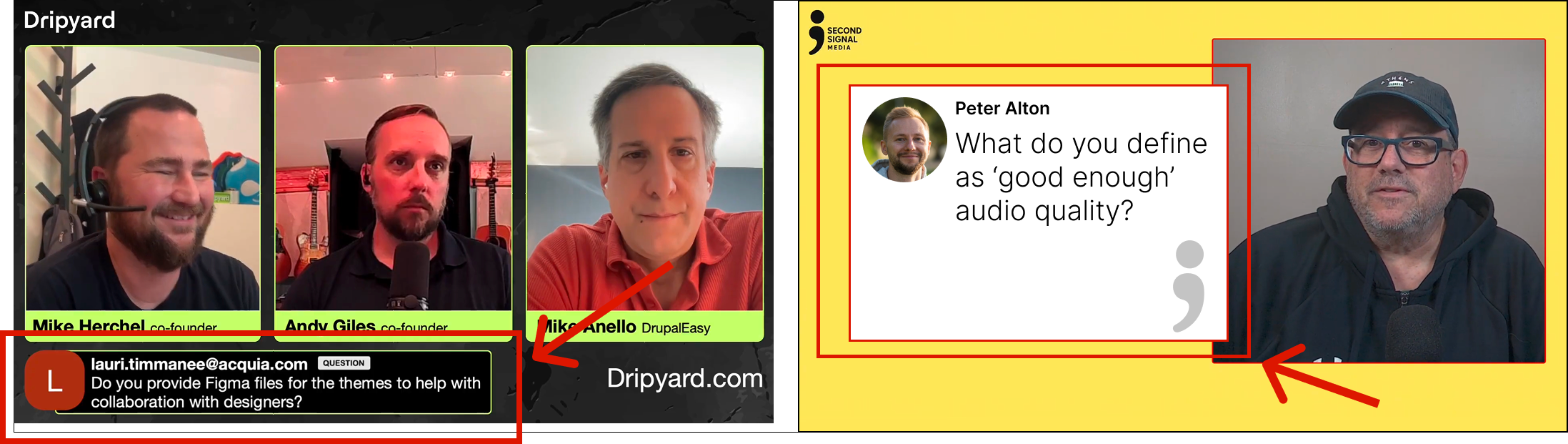
At Second Signal Media, we’ve seen webinars' energy and audience retention shift dramatically simply by integrating comment banners into the production flow. Here’s why they work, how to use them, and how to make them a natural part of your next live event.
Why Comment Banners Work So Well
1. They make attendees feel seen
When someone’s question appears on screen, it creates an instant connection. It tells the entire audience, Real people are here. Real questions matter, and we care about what you think.
2. They add structure during interactive moments
A highlighted question on screen gives speakers a clear target and prevents rambling.
You control the flow by choosing which comments appear, creating a guided discussion.
3. They create replay-friendly context
Replays often lose the richness of the live chat.
By placing selected comments on screen:
Viewers know what question is being answered
Key moments become easier to skim
Clips edited later retain valuable context
For organizations building webinar libraries or content repurposing pipelines, this is a major win.
4. They elevate production value instantly
A clean, branded comment banner conveys professionalism on par with broadcast television.
Even one or two thoughtful on-screen moments signal to attendees - This isn’t another Zoom lecture, this is a produced experience.
What to Highlight in Comment Banners
Not every comment deserves screen time. Choose strategically:
Smart questions that reflect common audience concerns
Reactions that validate your key point
Clarifying comments that help the entire audience
Guided responses (e.g., “Drop your biggest roadblock in the Q&A…”)
Take Questions at Planned Points Throughout the Webinar
Why?
Keeps engagement high
Attention naturally drops during long, uninterrupted presentations. Short Q&A checkpoints pull people back in.Clarifies concepts before moving on
If a section builds on the last unanswered question, confusion can compound.Makes the webinar feel interactive
Treating Q&A as part of the content, not an afterthought, signals professionalism and intention.Reduces “final bottleneck fatigue”
Saving all questions for the end often causes rushed answers or running out of time entirely.
The Moderator Makes This Possible
You need a moderator to help manage comments. From answering them directly in the chat to identifying which questions should appear on screen for presenters to answer. A moderator should:
Collect questions
Filter out duplicates
Select the strongest ones
Prepare the presenter when a “Q&A moment” is coming
Without a moderator, Q&A can feel disruptive, but with one, it feels polished and intentional.
Second Signal Media can help you boost your webinar engagement and take it to the next level.